HomeHow It WorksFeaturesPricingFAQSupport Sign in ↓ Download for Windows
MULTI-CREATOR CLIPPING FOR WINDOWS

Add the creators. Wake up to clips.

Track any public streamer on Kick, Twitch, YouTube or TikTok. Jolnova records every broadcast on your own machine, finds the moments worth posting, and cuts the dead air out of them. You review what is worth keeping.

Track streamers who are not youRecords on your PC — no VOD needed Dead air cut automaticallyNothing leaves without your approval
Jolnova
Jolnova dashboard with pipeline overview and review queue
Kick — live tracking Twitch — live tracking TikTok — live tracking YouTube — live tracking My Files — MP4, MKV, MOV, WEBM

From live source to review-ready clip.

Jolnova handles the repetitive part — watching, recording, cutting and captioning. You keep the decision about what actually gets posted.

01

Add a source

Paste a Kick, Twitch or TikTok channel, a video link, or pick a file from your computer.

  • Kick, Twitch and TikTok channels
  • YouTube and VOD links
  • Your own video files
02

Jolnova captures it

Live sources are monitored in the background, within the days and hours you allow.

  • Recording starts when a source goes live
03

Moments are found

The recording is analysed on your own computer and the moments worth watching are cut out as candidates.

  • No AI score, no quality grade
  • 9:16 formatting
  • Burned-in subtitles
04

Review and export

Clips arrive in a queue. Approve what you like, fix the subtitles and download it in HD.

  • Approve or reject
  • Titles written on approval
  • Download anywhere you choose
CAPABILITIES Windows 10 / 11 · runs locally
Live Tracking
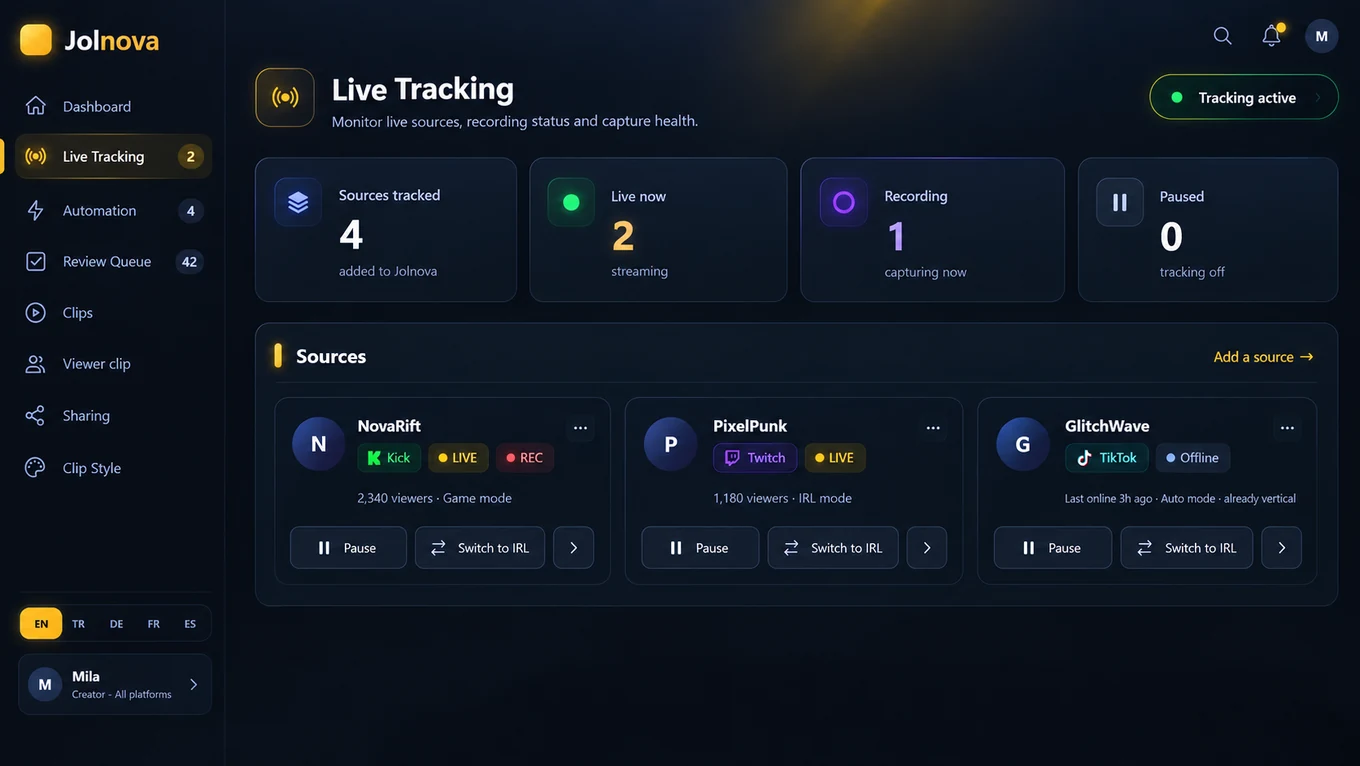
Live tracking view showing tracked sources and recording state
The tracking view: which sources are being watched, and which one is recording right now.
Live source tracking
Jolnova checks your Kick, Twitch, YouTube and TikTok sources continuously. The moment a channel goes live, recording begins by itself — you do not have to be at the computer when it starts. Solo records four streams at once; Studio and Agency set no limit in the software.
Vertical formatting
Five layouts fill a 9:16 frame: Auto, Game, IRL, Camera corner and Full screen — set per streamer.
Editable subtitles
Speech is transcribed and burned in. Misheard a word? Fix the line or delete it — on every plan.
Titles written for you
Approve a clip and the AI writes its title from what actually happens in it — not a filename.
HD export
Approved clips download at full quality to any folder you pick, with the watermark on or off.
SUBTITLES

Fix what it mishears.

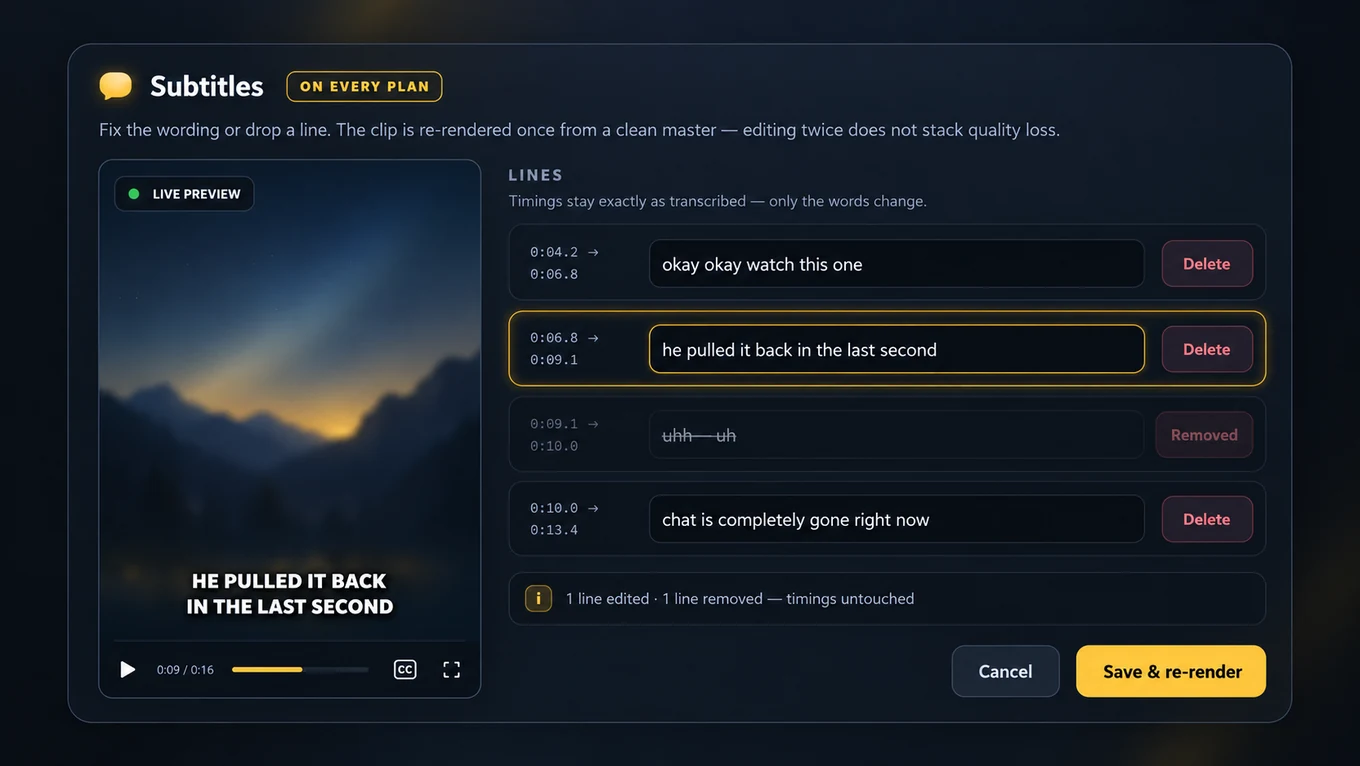
Open a clip and every subtitle line is there with its timecode. Fix a misheard word, rewrite the sentence, or delete a line you do not want on screen. The clip is re-rendered once from a clean master, so editing twice does not stack quality loss.

  • Edit or delete any subtitle line — on every plan
  • Timings stay exactly as transcribed, only the words change
  • Font, size, colour, outline, placement and a background box on every paid plan
  • Live preview on a real frame while you tune the style
Subtitle text
Subtitle editor with the transcribed lines open for editing

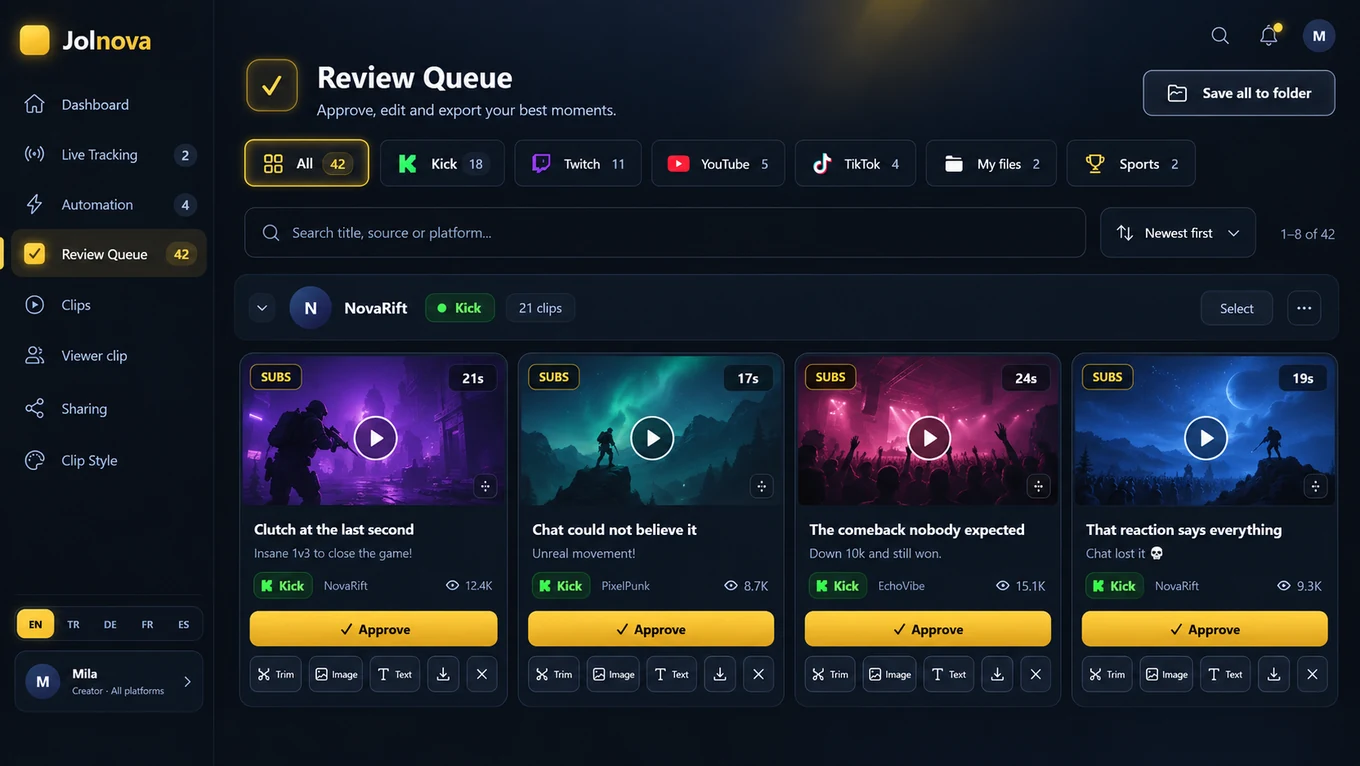
Everything it made lands in one queue.

Every produced clip lands in one queue, grouped by source. Filter by platform, search by title, and approve the ones worth posting.

  • Filter by Kick, Twitch, TikTok, YouTube or your own files
  • Search across titles and sources
  • Approve or reject with a single click
  • Select several clips and act on them together
  • Download approved clips in HD
Review Queue
Review queue with generated clips ready for approval
CLIP EDITOR

What can you change after the cut?

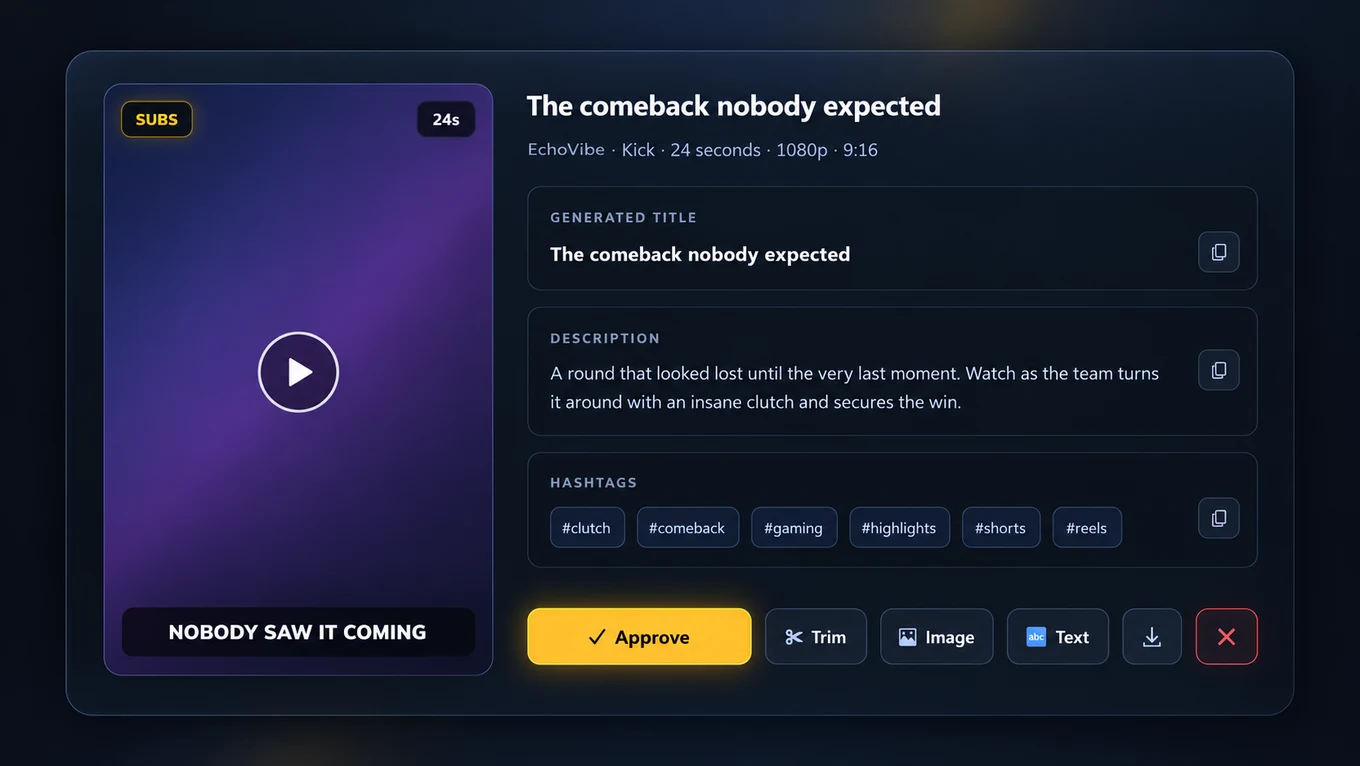
Open any clip and you get the whole picture: the vertical preview, the generated title, description and hashtags, and the tools to change what you do not like.

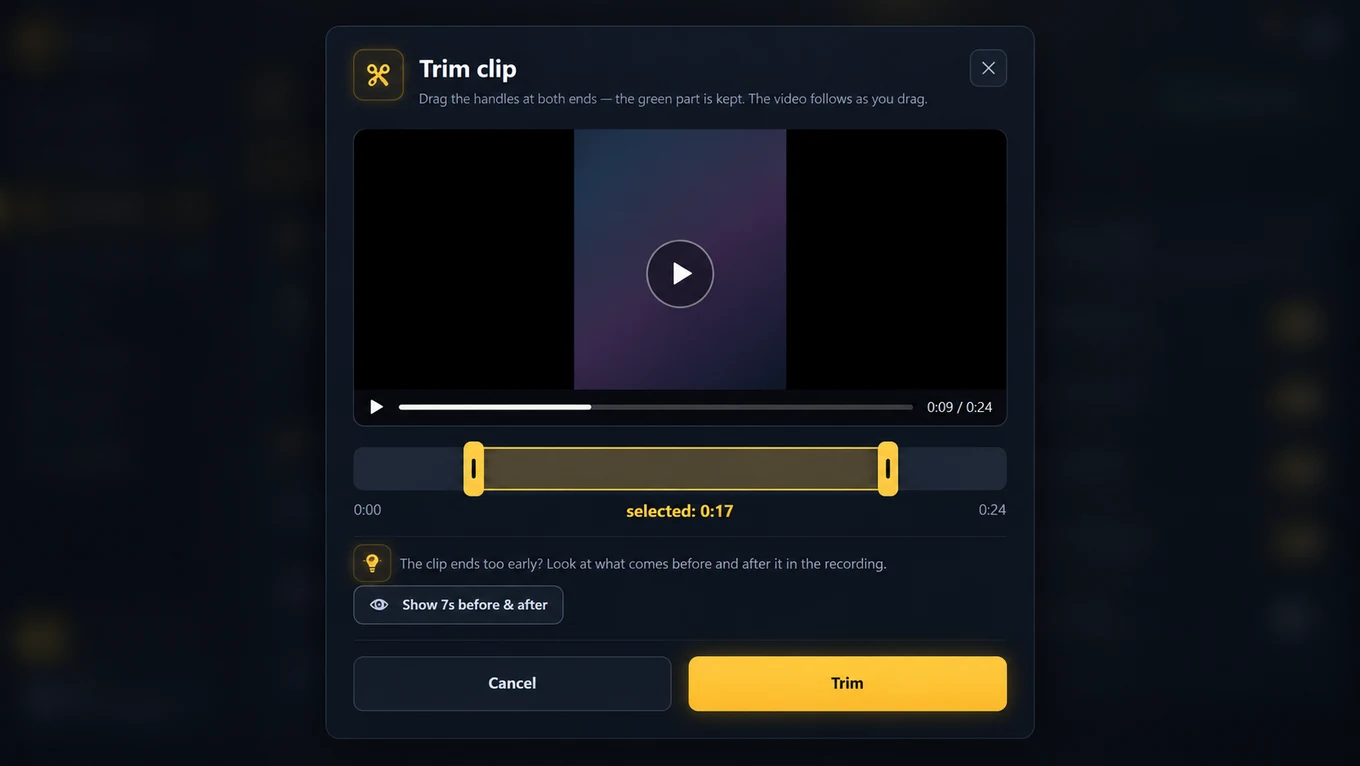
  • Trim the start and end with two handles
  • Fix the subtitle text line by line
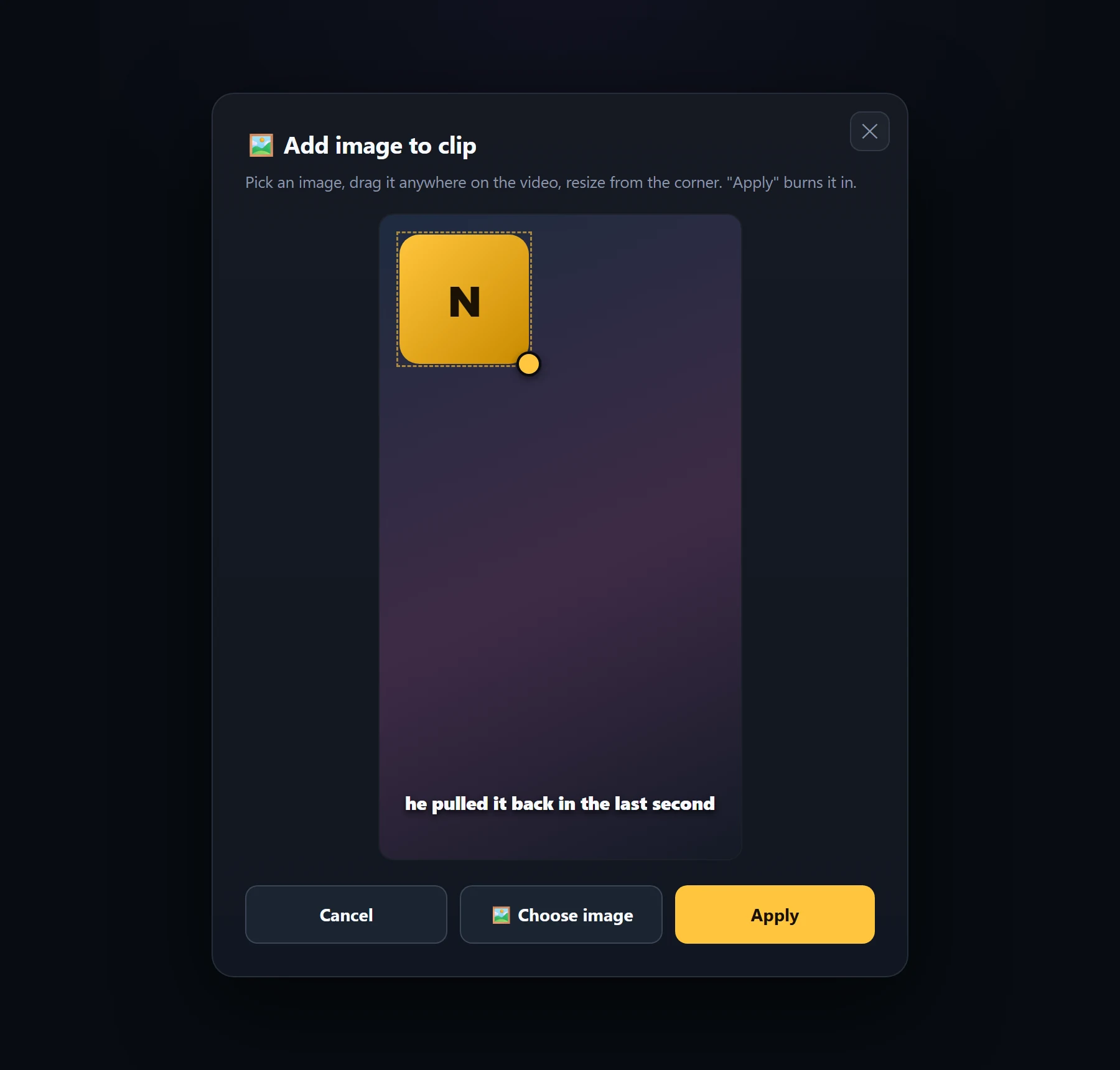
  • Drag an image onto the frame and resize it
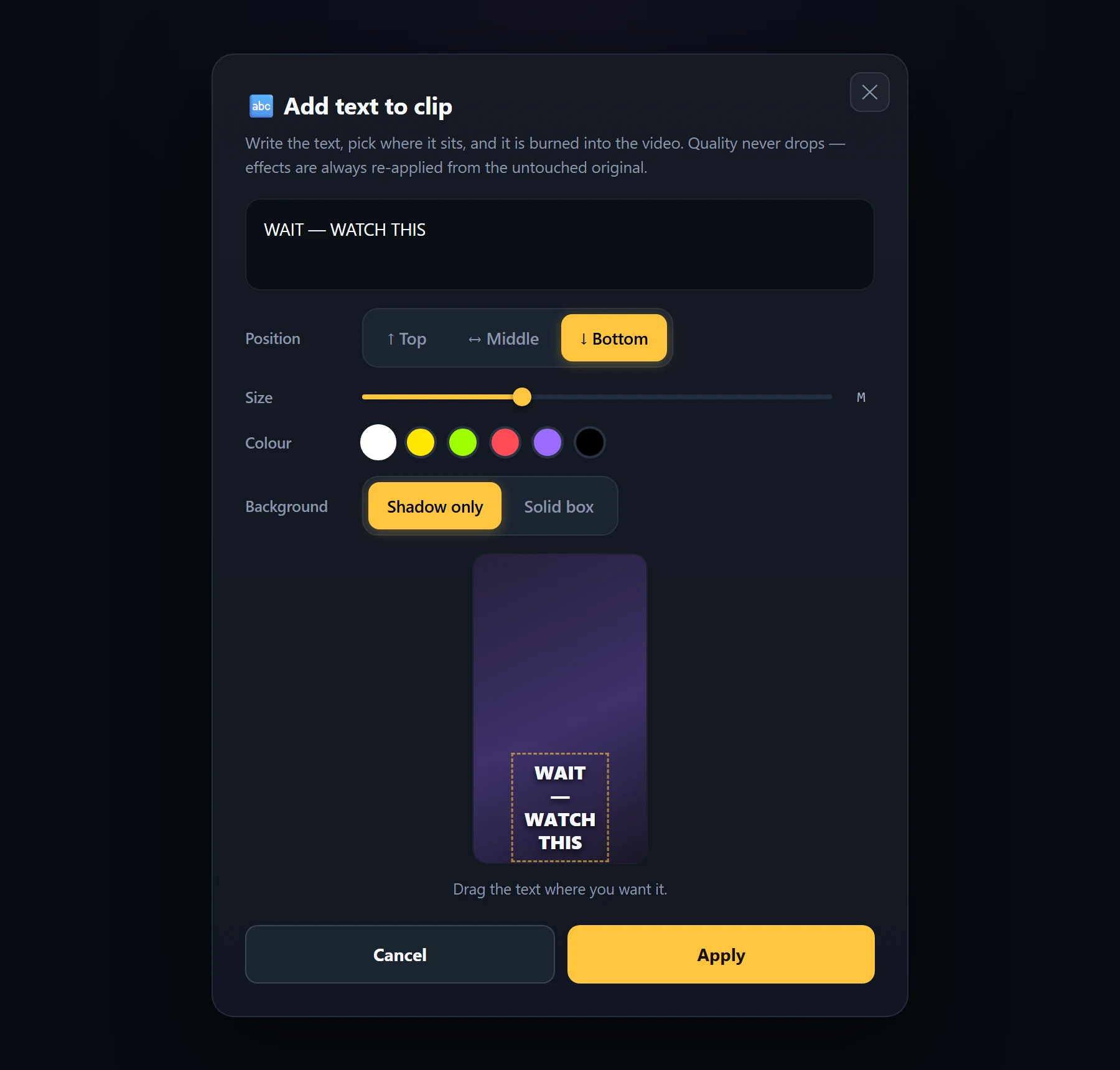
  • Add text with position, size, colour and background
  • Remove any effect and get the original clip back
  • No quality loss — effects are re-applied from the untouched source
Clip detail
Clip detail with generated title, description and hashtags
Trim
Trim editor with start and end handles
Trim clipDrag the handles until the clip opens on the moment itself.
Image
Image overlay being dragged and resized on the video
Add an imagePlace a logo anywhere on the frame and resize it from the corner.
Text
Text overlay editor with position, size and colour controls
Add textWrite a hook, pick where it sits and give it a background if you want one.

Your clip, your name on it.

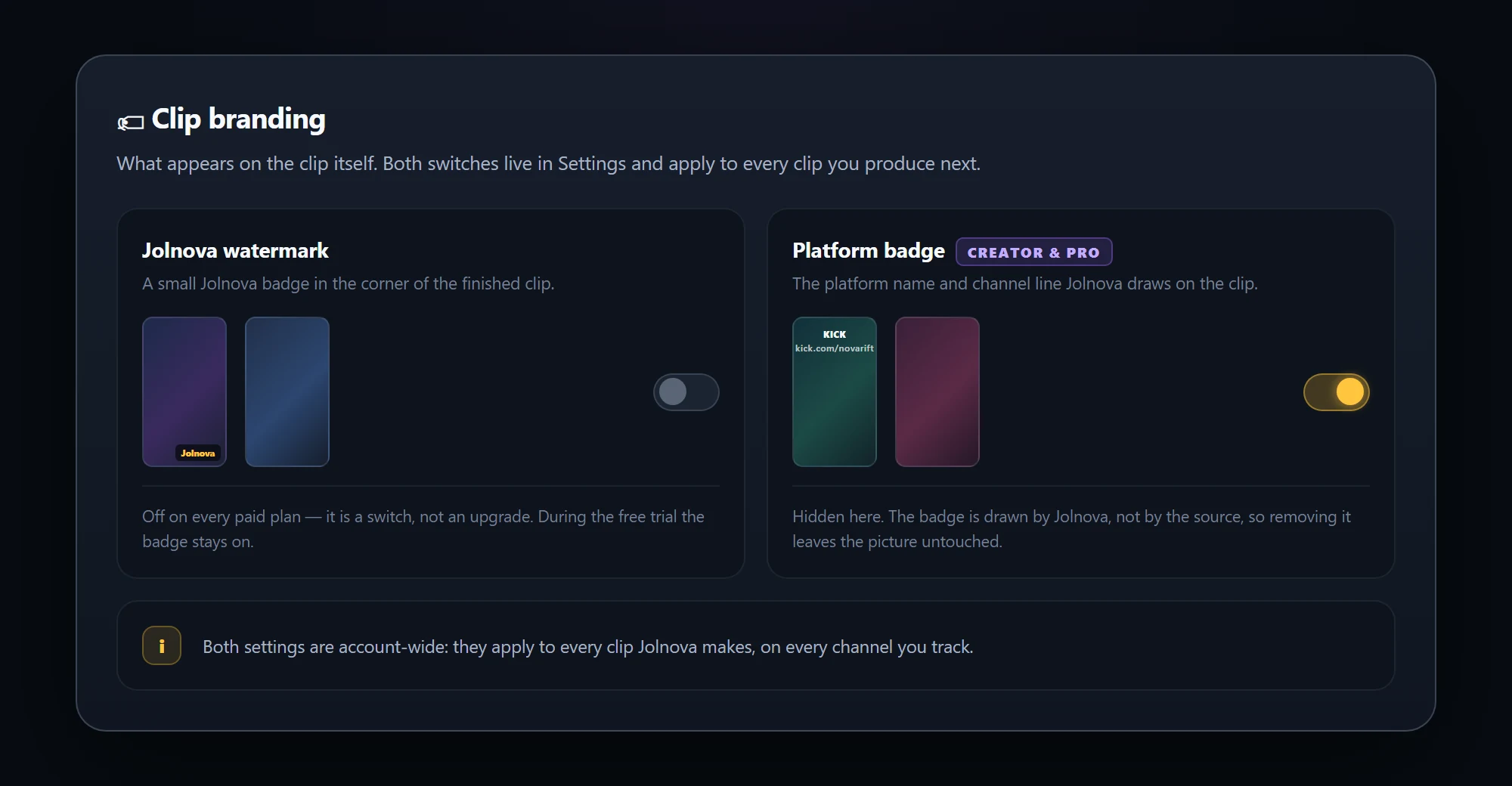
Two things can end up written on a finished clip, and both are switches in Settings rather than paid upgrades.

  • The Jolnova watermark — off on every paid plan
  • The platform badge and channel line — hide it on Studio and Agency
  • The badge is drawn by Jolnova, so removing it leaves the picture untouched
Clip branding
Clip branding settings with watermark and platform badge switches
SOURCES
SourceHow it is picked upWhat to know
KickLive tracking Add a channel and Jolnova records automatically when it goes live.
TwitchLive tracking Same automatic capture workflow as Kick, including past broadcasts.
TikTokLive tracking Tracked live as well. TikTok streams are already vertical, so clips keep the original frame.
YouTube & VODLink processing No live tracking here — paste a video, VOD or past stream link and Jolnova processes it on demand.
✓

My Files is included with every plan. Pick a video already on your PC — a podcast, an interview, an old recording. The file is read in place, never moved or deleted, and never counts as a platform.

Who uses it

Streamers
Turn a six-hour broadcast into a set of short-form candidates without scrubbing the timeline yourself.
Gaming creators
Reactions, clutches and chat explosions get cut with the camera and gameplay both in frame.
Podcasters & interviews
Point Jolnova at a local recording and get vertical segments with subtitles already burned in.

Capabilities by source type.

Live sources are tracked continuously. Links and local files are processed when you ask for them.

CapabilityLive sourcesVideo linksLocal files
Automatic recording✓n/an/a
Live tracking✓n/an/a
Simultaneous recording✓n/an/a
Moment detection✓✓✓
Vertical 9:16 output✓✓✓
Title generation✓✓✓
Burned-in subtitles✓✓✓
Subtitle text editing✓✓✓
Subtitle styling✓✓✓
Review queue✓✓✓
HD download✓✓✓
Watermark on or off✓✓✓
Hide the platform badge✓✓n/a

Availability also depends on your plan — subtitle styling comes with every paid plan, and hiding the platform badge with Studio and Agency. Subtitles themselves are burned in on every plan, and fixing a misheard word is free everywhere.

FREE TRIALTry it before you pay

Free for 3 days. What's included →

↓ Start free

When the trial ends, new clip production stops. The clips you already made are files on your own computer and stay where they are.

Build your clip pipeline once.

Add your sources, keep streaming, and review the moments Jolnova prepared while you were busy.

Pricing is not open yet — the app is free to use in the meantime. Your own video files will be included on every plan and never count as a platform.